Financial information
Saved payment cards, banking sessions, and card or bank account numbers sitting in old statements, invoices and spreadsheets.

Emptying the Recycle Bin and clearing your browser doesn't really erase anything. Evidence Wipe finds the browsing history, cookies, saved passwords, card numbers and deleted files left on your PC, shows you exactly what it will remove, then securely overwrites it for good.
2 things left to fix. Your Privacy Assistant has the steps.
When you delete a file or empty the Recycle Bin, Windows only removes the file's name from the drive's index. The contents stay on the disk until something happens to overwrite them, which is why free recovery tools can often bring back photos, documents and spreadsheets months later.
Your browser works the same way. Clearing history removes entries from view, but they can linger inside the browser's database files, along with cookies, autofill entries, saved card details and logins. Windows also keeps its own record of the files you opened, the programs you ran and the things you searched for.
Evidence Wipe cleans all of it in one place and overwrites the data instead of just hiding it.
Your computer quietly stores a detailed record of your life. Evidence Wipe tracks it down across your browsers, Windows and your own files.
Saved payment cards, banking sessions, and card or bank account numbers sitting in old statements, invoices and spreadsheets.
Names, addresses, phone numbers and emails stored in browser autofill, plus ID and passport numbers found in your documents.
Websites you visited, searches, downloads list, cache and tracking cookies, for every browser and every profile.
Recent files lists, jump lists, Office recent documents and thumbnail caches that show what you've opened.
Saved browser passwords - opt-in and clearly warned, so you never lose a login you meant to keep.
Files you thought were gone. Wipe free space overwrites them so recovery software has nothing to find.
Evidence Wipe combines a privacy cleaner, secure file shredder, sensitive data finder and drive eraser - with clear explanations at every step, so you always know what's happening.
A privacy cleaner that shows you everything before it deletes anything.
See exactly what will be deleted before you commit: every browser entry, file and Windows item, grouped and sized. Search the list, untick anything you want to keep, then clean with confidence. No surprises, no lost bookmarks.
Clear browsing history, cookies, cache, autofill, downloads list and saved cards separately for Chrome, Edge, Firefox, Brave, Opera and Vivaldi - each profile on its own. Bookmarks always stay.
Erase Run and File Explorer search history, recent documents, jump lists, Office recent files, Activity History, thumbnail caches and Prefetch traces.
Empty the Recycle Bin securely, clear temporary files, clipboard and crash dumps - and free up disk space while you're at it.
Set it once and Evidence Wipe cleans automatically each day or week, with a report every time.
Old tax returns, scanned passports and bank statements tend to pile up. Evidence Wipe finds them.
Scan your documents, PDFs, spreadsheets and text files for credit card numbers, bank and IBAN numbers, Social Security and ID numbers, and passwords. Card numbers are validated to cut false alarms, and everything is masked on screen. Shred what you don't need in one click.
A built-in AI model spots documents that look medical, financial, legal or identity-related - even without an obvious number - and tells you why. It runs entirely on your PC. Nothing is uploaded.
Deleting a file on your PC doesn't delete it from the cloud. Evidence Wipe flags files synced with OneDrive, Dropbox, Google Drive and iCloud so you know to remove the online copy too.
A file shredder and free space wiper that uses the right method for each drive.
SSDs and hard drives store data differently, so they need different erase methods. Evidence Wipe detects whether each drive is an SSD, NVMe, hard drive or USB stick and picks the right approach automatically: a verified overwrite plus TRIM on SSDs, or your choice of DoD 5220.22-M or Gutmann on hard drives.
Drag and drop files or folders to overwrite them before deletion. Important Windows folders are protected so you can't shred something by mistake.
Right-click any file or folder in File Explorer and choose Shred with Evidence Wipe. One confirmation, even for a whole selection.
Overwrite the empty space on a drive so files you deleted in the past can't be recovered. Your current files aren't touched.
Scan, wipe free space or fully erase USB flash drives, SD cards and external hard drives before you give them away or throw them out.
Know where you stand, what to do next, and have a record of what was erased.
One privacy score for your PC, with plain reasons behind it: how much history is stored, sensitive files found, when you last cleaned and whether protection is on.
Ask questions in plain English - "how do I wipe my PC before selling it?" - and get a clear answer plus a to-do list tailored to what was found on your computer.
Get a notification when a new download contains card numbers or other sensitive data, or when a USB drive is plugged in, so you can deal with it straight away.
Every clean, shred and wipe produces a report showing what was erased, how and when, with a tamper-check fingerprint. Export to CSV and hide file names if you share it.
No technical knowledge needed. Evidence Wipe explains each item in plain language and picks safe, recommended defaults for you.
Evidence Wipe scans your browsers, Windows and drives and shows how much private data it found, with your privacy score on the dashboard.
Open the Cleaning Preview to see every item that will be removed. Keep the recommended selection or tick and untick exactly what you want.
Click Clean. Data is overwritten using the right method for your drive, then a verification report confirms what was erased.
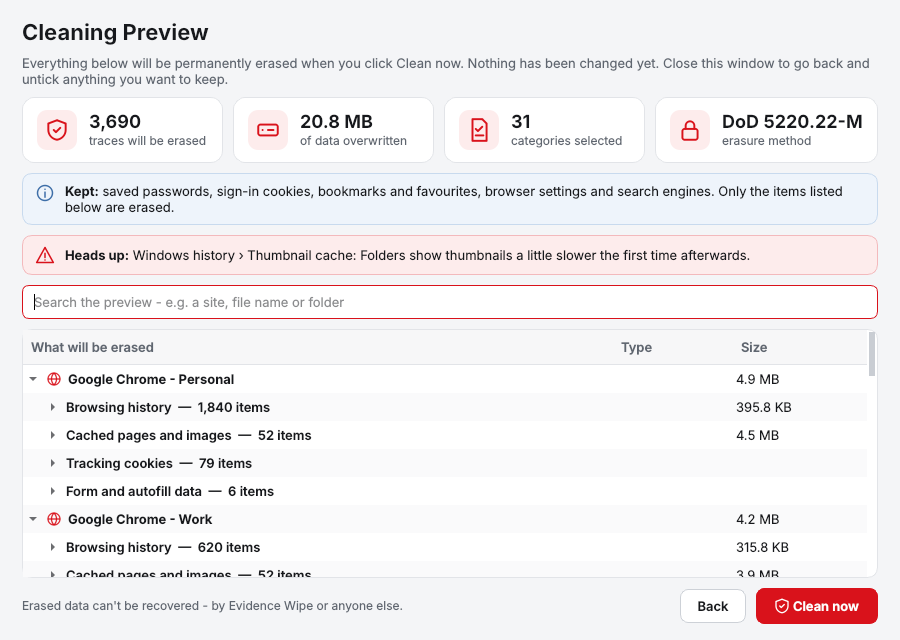
Multi-browser cleanup with separate control over every profile, plus deep cleaning of the places Windows keeps a record of your activity.
| Area | What Evidence Wipe removes |
|---|---|
| Web browsers | Google Chrome, Microsoft Edge, Mozilla Firefox, Brave, Opera, Vivaldi, plus Internet Explorer leftovers - every profile listed separately |
| Browser data | Browsing history, search history, tracking cookies, cache, download history, form and autofill data, saved payment cards, saved passwords (opt-in), session data |
| Windows history | Recent documents, jump lists, Run history, File Explorer search and address history, Activity History, Office recent files, thumbnail cache, Prefetch |
| System | Recycle Bin (secure), Windows and user temp files, clipboard, crash and memory dumps, error reports |
| Your files | Any file or folder you choose, via drag and drop or right-click in File Explorer |
| Drives | Free space on internal SSDs, NVMe and hard drives; full erase of USB sticks, SD cards and external drives |
| Sensitive data scan | Documents (.docx, .rtf, .odt), PDFs, spreadsheets (.xlsx, .ods, .csv), text and email files (.txt, .eml, .msg) |
| Requirements | Windows 10 (version 1809 or later) or Windows 11, 64-bit |
Choose a recognized overwrite standard, or let Evidence Wipe pick the best method for each drive automatically.
One verified overwrite followed by TRIM, following NIST 800-88 guidance for flash storage.
The well-known US Department of Defense overwrite pattern for hard drives.
An extended seven-pass version for extra peace of mind on hard drives.
The most thorough classic method, for older hard drives and maximum caution.
Every pass is read back and checked. Because SSDs manage storage internally, no software can guarantee every copy of the data on an SSD is overwritten; for retiring an SSD completely, use its manufacturer's secure-erase tool after cleaning.
Whether you're protecting your family's information or getting an old laptop ready to sell, Evidence Wipe makes it simple.
Keep your browsing, banking and personal documents private on a computer other people use.
Erase your personal data before you sell, donate, trade in or recycle a computer or drive.
Find and remove client data, invoices and records holding card or bank details you no longer need.
One simple price. Pay once, keep it for good, and get free updates.
One-time payment · no subscription
You'll go straight to your download page once payment is confirmed, and we'll email your download link and license key.
Already bought? Get your download link again. Lost your key? Recover it here.
Deleting a file in Windows only removes its name from the drive's index; the contents stay on the disk until something overwrites them, which is why recovery tools can bring them back. Evidence Wipe's File Shredder overwrites the file's contents before removing it. Drag files onto the shredder or right-click them in File Explorer and choose Shred with Evidence Wipe.
Not completely. Browsers keep history in database files, and cleared entries can stay in unused space inside those files. Evidence Wipe removes the entries and overwrites the space they used, for each browser profile separately, while keeping your bookmarks.
Use Wipe Free Space on the Drives page. It overwrites the empty space on a drive, which is where files you deleted in the past still sit. Your existing files are not touched.
Yes, but SSDs need a different approach to hard drives. Multi-pass overwriting wears an SSD without making the data any safer, so Evidence Wipe detects the drive type and uses a single verified pass followed by TRIM on SSDs, in line with NIST 800-88 guidance. On hard drives you can choose DoD 5220.22-M or Gutmann.
Back up what you want to keep, run a full clean to remove browsing history, saved passwords and Windows activity, shred personal folders, then run Wipe Free Space on every drive. Evidence Wipe saves a verification report so you have a record of what was erased.
Sensitive Data Discovery scans your documents, PDFs, spreadsheets and text files for card numbers, bank account and IBAN numbers, ID numbers and passwords. Card numbers are checked with the Luhn test to cut false alarms, and results are masked on screen.
Yes. Cleaning Preview lists every item, file and browser entry that will be removed, with sizes, and lets you untick anything before you confirm.
Bookmarks are never removed. Saved passwords and payment cards are opt-in: they stay unticked unless you choose them, and you are warned before they are deleted.
No. Scanning, AI detection and erasing all run on your PC. The only things that go online are the license key check and the update check.
Yes. Scanning, the Cleaning Preview, Sensitive Data Discovery, the Privacy Dashboard and reports all work without a key, so you can see exactly what Evidence Wipe finds on your PC. Your Installation Key unlocks cleaning, shredding, free-space wiping and drive erasing.
Windows 10 (version 1809 or later) and Windows 11, 64-bit.
Yes. $44.95 once, with free updates and no subscription.
Yes. The Drives page lists USB sticks, SD cards and external drives. You can scan them for sensitive files, wipe their free space or erase them completely, with a report at the end.
Find it, preview it, erase it for good. One license, no subscription.
Get Evidence Wipe · $44.95